
Skullmster
New member
- Joined
- Oct 5, 2025
- Messages
- 6
- Points
- 3
I know that the creator of the mod has openly said he will not be supporting Windows 11. I spent several hours figuring things out before I got it right. I HIGHLY doubt this will affect anyone else, but just in case I figured i'd post my solution. Please look below for the solution.
What: If you see this message, then it may be caused by Windows SmartScreen. It is designed to stop unknown programs from other computers and/or sources. If you want to test it go to your D2 folder and launch game.exe. If you see a blue window pop up saying it was blocked by SmartScreen you know what happened.
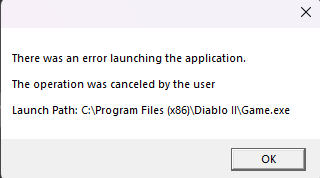
How: So, I have not had issues with SmartScreen on any other windows computer yet and nothing on it previously. I was messing with things and accidently wound up launching an updater (not cactus's fault, was definitely way outside the parameters on my end). Long story short I was messed up some files pretty bad and had to not only uninstall but delete the registry and physical D2 folder from the computer. It took multiple reinstalls and tests to figure it out and somehow it triggered SmartScreen to start screening the game.exe files entirely.
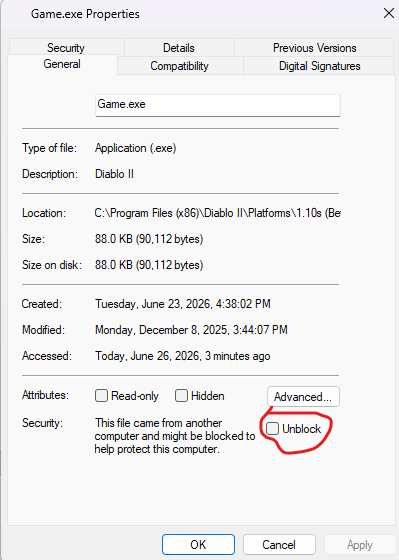
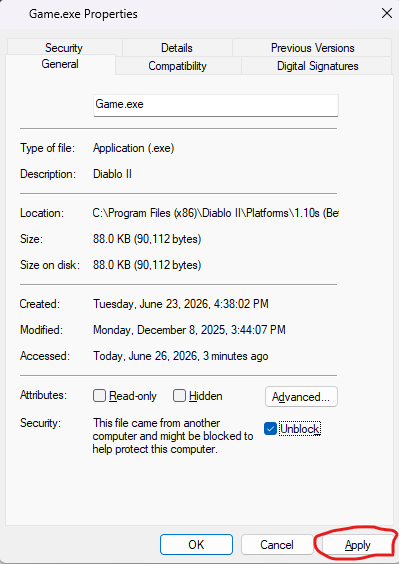
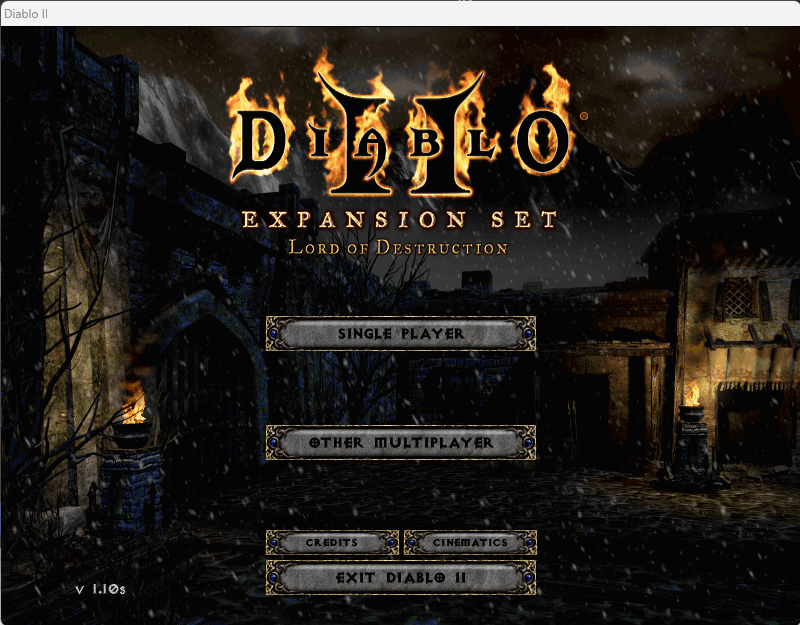
Solution: I temporarily turned off SmartScreen and everything worked, but that is neither ideal nor safe. Instead, we should unblock the game.exe files that are affected. Go into your platforms folder, go into the version you want to unblock (I.E 1.00) and right click the game.exe file. Go to properties and at the bottom you'll see a new security portion about the file being blocked to protect this computer. Check the unblock box and apply. Do this of any and every game version/mod you want. For me, I did all of them since I never know what version I want to use. Still if you only play 1.00, 1.07, and 1.10 then unblock those files. You don't have to worry about the rest if you aren't using them. I included pictures as well just in case my explanations only made sense in my head and I used 1.10s as an example since that's where I was when I decided to make this post. You'll see at the end that it launched right from Cactus without any prompts or issues. I hope this helps!
What: If you see this message, then it may be caused by Windows SmartScreen. It is designed to stop unknown programs from other computers and/or sources. If you want to test it go to your D2 folder and launch game.exe. If you see a blue window pop up saying it was blocked by SmartScreen you know what happened.
How: So, I have not had issues with SmartScreen on any other windows computer yet and nothing on it previously. I was messing with things and accidently wound up launching an updater (not cactus's fault, was definitely way outside the parameters on my end). Long story short I was messed up some files pretty bad and had to not only uninstall but delete the registry and physical D2 folder from the computer. It took multiple reinstalls and tests to figure it out and somehow it triggered SmartScreen to start screening the game.exe files entirely.
Solution: I temporarily turned off SmartScreen and everything worked, but that is neither ideal nor safe. Instead, we should unblock the game.exe files that are affected. Go into your platforms folder, go into the version you want to unblock (I.E 1.00) and right click the game.exe file. Go to properties and at the bottom you'll see a new security portion about the file being blocked to protect this computer. Check the unblock box and apply. Do this of any and every game version/mod you want. For me, I did all of them since I never know what version I want to use. Still if you only play 1.00, 1.07, and 1.10 then unblock those files. You don't have to worry about the rest if you aren't using them. I included pictures as well just in case my explanations only made sense in my head and I used 1.10s as an example since that's where I was when I decided to make this post. You'll see at the end that it launched right from Cactus without any prompts or issues. I hope this helps!