How do I add mods? (Basemod)

Ethaniel

New member
Joined
Aug 16, 2025
Messages
7
Points
3
Hello everyone
I'd like to port a mod with plugy to cactus that I use in D2SE but it doesn't show the full inventory.
The mod is Basemod https://www.moddb.com/mods/basemod
I've been playing this mod mostly to do a grail. Been on it for around 4 years now.
The mod uses 1.13c patch and it's mostly a QoL mod.
I'm mostly interested in porting my plugy stash than the mod itself.
I would also be ok to just use my stash in a vanilla 1.13 setup if possible.
I have trouble figuring out the plugy setup.
Thanks
 
Hey @Ethaniel,

There is no one specific way to port a mod and not all mods are compatible with Cactus. Not because Cactus changes anything, but I would say it's because a lot of mods due weird things. The farther the mod goes from the way Diablo II normally works and expects things to be in, the higher the chance it won't work.

You'll need to do a lot of experimentation. It's a lot of trial and error. I would recommend reading the Cactus Porting Advice page, and also taking a look and downloading different existing mods on the Cactus Ports Collection and reading the sections regarding Porting Fixes and looking at the file structure and configuration files for these mods to see how they are wired. Depending on the mod and how DLLs are loaded, you may also need to patch some files as well. Normally for D2SE mods, I normally also take an initial look at the D2SE config file to get a hint if it's loading any specific DLLs for it or anything else I can get out of that file. I also need to move or remove a bunch of files that may not be needed for Cactus, and I usually also have to patch some files to allow one of the main DLLs to load. D2SE does this patching automatically, Cactus doesn't because Cactus is a file level file switcher and it's an explicit design choice for Cactus not to make any modifications or interfere with the user's files. This means the mod owner is responsible for providing the patching mechanisms for their own mods. I've also collected these files which I used to port all of the mods in my collection. BaseMod and PlugY both have fields in their configuration files to allow additional DLLs to load. I've gotten weird results with BaseMod not loading the DLLs I've told it to load though. And of course just cause you tell one of these mods to load a DLL, it doesn't necessarily mean it's compatible with the rest of the game or the combination of DLLs you have loaded.

Good luck!
 
Hey @Ethaniel,

There is no one specific way to port a mod and not all mods are compatible with Cactus. Not because Cactus changes anything, but I would say it's because a lot of mods due weird things. The farther the mod goes from the way Diablo II normally works and expects things to be in, the higher the chance it won't work.

You'll need to do a lot of experimentation. It's a lot of trial and error. I would recommend reading the Cactus Porting Advice page, and also taking a look and downloading different existing mods on the Cactus Ports Collection and reading the sections regarding Porting Fixes and looking at the file structure and configuration files for these mods to see how they are wired. Depending on the mod and how DLLs are loaded, you may also need to patch some files as well. Normally for D2SE mods, I normally also take an initial look at the D2SE config file to get a hint if it's loading any specific DLLs for it or anything else I can get out of that file. I also need to move or remove a bunch of files that may not be needed for Cactus, and I usually also have to patch some files to allow one of the main DLLs to load. D2SE does this patching automatically, Cactus doesn't because Cactus is a file level file switcher and it's an explicit design choice for Cactus not to make any modifications or interfere with the user's files. This means the mod owner is responsible for providing the patching mechanisms for their own mods. I've also collected these files which I used to port all of the mods in my collection. BaseMod and PlugY both have fields in their configuration files to allow additional DLLs to load. I've gotten weird results with BaseMod not loading the DLLs I've told it to load though. And of course just cause you tell one of these mods to load a DLL, it doesn't necessarily mean it's compatible with the rest of the game or the combination of DLLs you have loaded.

Good luck!
Seems like a hassle but I'll try anyway.
Would it be easier to just have an 1.13 instance with plugy to just use my stash for grail? I hate mules 😂
 
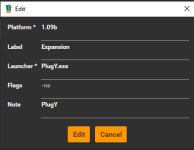
@Ethaniel if all you want is to run PlugY to retain your current stash, then yes, that should work easily with Cactus. Just make sure all the appropriate PlugY files are in the Cactus folder, and then add a launcher in Cactus that runs PlugY.exe. I attached a screenshot that shows you what mine looks like. Oh, and once you run the platform at least once, it will create a corresponding saves folder. You'll want to drop your saved characters into that folder. Let us know how it goes, and welcome to the community!
 

Attachments

  • cactus-plugy.png
    cactus-plugy.png
    8.5 KB · Views: 135
@Ethaniel if all you want is to run PlugY to retain your current stash, then yes, that should work easily with Cactus. Just make sure all the appropriate PlugY files are in the Cactus folder, and then add a launcher in Cactus that runs PlugY.exe. I attached a screenshot that shows you what mine looks like. Oh, and once you run the platform at least once, it will create a corresponding saves folder. You'll want to drop your saved characters into that folder. Let us know how it goes, and welcome to the community!
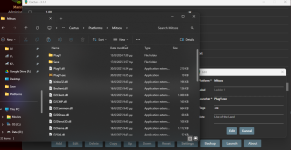
it doesnt seem to run anything. i added plugy files to cactus and my "platform" using 1.13c files.
 

Attachments

  • Screenshot 2025-08-17 040955.png
    Screenshot 2025-08-17 040955.png
    360.2 KB · Views: 174
it doesnt seem to run anything. i added plugy files to cactus and my "platform" using 1.13c files.
Hmm.

Did you click Reset in Cactus?

Also, FYI, my PlugY files are not in the Platform folder. They are only located in the main Cactus directory alongside files such as Cactus.exe, etc.
 
@Ethaniel if all you want is to run PlugY to retain your current stash, then yes, that should work easily with Cactus. Just make sure all the appropriate PlugY files are in the Cactus folder, and then add a launcher in Cactus that runs PlugY.exe. I attached a screenshot that shows you what mine looks like. Oh, and once you run the platform at least once, it will create a corresponding saves folder. You'll want to drop your saved characters into that folder. Let us know how it goes, and welcome to the community!
You'll want to change the PlugY behavior so it doesn't hijack the save path. Cactus should be the one controlling that since it will be easier and will provide protection for your saves. This is a fix I automatically do for all of the mods I've ported to Cactus. Example:

Porting Fixes
  • The mod will normally force save to the save\DarkAlliance directory in your Diablo II Root Directory. However, I've edited the PlugY.ini and changed ActiveSavePathChange to 0, which allows Cactus to manage the folder.
I also recommend to have PlugY installed at the platform level. They are not protected by Cactus and thus another platform having files of the same name will delete those files. Different mods also sometimes have their own versions of PlugY so they behave better when they are all isolated.
 
You'll want to change the PlugY behavior so it doesn't hijack the save path. Cactus should be the one controlling that since it will be easier and will provide protection for your saves. This is a fix I automatically do for all of the mods I've ported to Cactus. Example:

Porting Fixes
  • The mod will normally force save to the save\DarkAlliance directory in your Diablo II Root Directory. However, I've edited the PlugY.ini and changed ActiveSavePathChange to 0, which allows Cactus to manage the folder.
I also recommend to have PlugY installed at the platform level. They are not protected by Cactus and thus another platform having files of the same name will delete those files. Different mods also sometimes have their own versions of PlugY so they behave better when they are all isolated.
Done as you said
added plugy to platform, but activesavepath was already 0.
anyway it works now, so thank you both.
maybe now it will be easier to add the mod in the platform
 
I also recommend to have PlugY installed at the platform level. They are not protected by Cactus and thus another platform having files of the same name will delete those files. Different mods also sometimes have their own versions of PlugY so they behave better when they are all isolated.
Now that you mention it - this has actually happened to me. You make a great point. I am going to move that ish into the platform folder.
 
Yup. You can try adding the BaseMod dll to one of the load library lines in the plugy ini and see if it works. The other way is to patch the DLLs so BaseMod gets loaded, and then add PlugY.dll into one of the BaseMod config dll lines. I think BaseMod comes with a patcher. If you do that it will modify one of the dlls (run it in the platform so the change is isolated to that platform's files) so that basemod.dll is loaded. When you run PlugY you normally don't need to do it if you run it through PlugY.exe. But if you look at the files link I sent you earlier, you may have noticed some plugy files called file patcher. If you that it would patch the d2gfx.dll so that it always loads plugy.dll. Doing this actually gives you a more stable launch. Using PlugY.exe may give you the "famous" ReadProcessMemory error (or something like that) where the game won't launch until I think you restart your computer.
 
Last edited:
OK!!
Everything is set :)
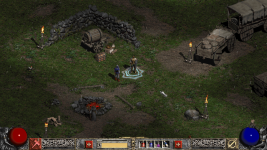
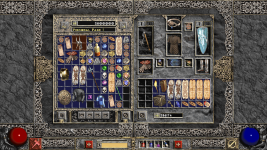
Can i share my modpack?
 

Attachments

  • Screenshot 2025-08-17 164453.png
    Screenshot 2025-08-17 164453.png
    3.1 MB · Views: 177
  • Screenshot 2025-08-17 164508.png
    Screenshot 2025-08-17 164508.png
    3.2 MB · Views: 166
I don't have any objections to it but since these files are outside of our control, I have to have a disclaimer that files downloaded outside of The Moving Caravan (or as part of files downloaded on my server) are done so at your own risk. Furthermore, any files linked in the forum cannot contain malicious or illegal content. Let's wait to hear back from @Manny before posting anything.

When you say say "modpack", I'm assuming you mean an entire Cactus Platform right? So basically copying an already configured Platform (Example: Copying your "Platforms/1.13c - Ethaniel" platform let's say?) If so make sure to double check the porting advice section to maximize compatibility, reduce file size, and ensure/reduce the chance that when people use your Platform it doesn't have interoperability issues with their other mods.
 
I don't have any objections to it but since these files are outside of our control, I have to have a disclaimer that files downloaded outside of The Moving Caravan (or as part of files downloaded on my server) are done so at your own risk. Furthermore, any files linked in the forum cannot contain malicious or illegal content. Let's wait to hear back from @Manny before posting anything.

When you say say "modpack", I'm assuming you mean an entire Cactus Platform right? So basically copying an already configured Platform (Example: Copying your "Platforms/1.13c - Ethaniel" platform let's say?) If so make sure to double check the porting advice section to maximize compatibility, reduce file size, and ensure/reduce the chance that when people use your Platform it doesn't have interoperability issues with their other mods.
Yes, I meant platform.
I took the 1.14d files from the cactus platforms and added Basemod 1.13.9, PlugY 14.03 and SGD2FreeRes.
The platform uses the game.exe provided by Basemod.
Anyway, thanks again for your inputs
 
Sounds good. Yea I remember doing this exact set up for several mods when I was porting them. It's a relatively common set up it seems lol. Some of them also use D2GL or these other type of stuff. For all of the Cactus Ports Collection mods I only test against the following:

Works perfectly out of the box with:

- Cactus
- cnc-ddraw (DirectDraw)
- DSOAL w/ OpenAL Soft (3D Sound, EAX)

There are some mods I've ported that have some hard dependency on some stuff that are not included here, but may still work with the above configuration. Usually if the mod doesn't work perfectly with the above set up they either get downgraded from Platinum to Gold, or I drop them out of my tree completely. There are so many mods out there that it isn't worth it for me to fight against trying to get a mod working. Although my tree is just my personal collection of mods that I've ported and update every once in a while. I encourage people to also maintain and distribute their own Cactus Ports.
 
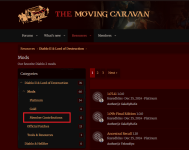
Hey @Ethaniel. I'm pleased to hear you got everything working. Please make sure you have reviewed all of the Cactus porting advice per @fearedbliss. Once that's done, as a registered member, you should have access to create "Resources" in the community Resource Manager. There you can upload your Cactus Platform (aka modpack) and provide general information. You can file it under the existing category that is called Mods, and in the section called "Member Contributions". The attached image is an aid. Please also make sure your files are archived/compressed before uploading (we typically use 7z). Once your resource is created, the community can start testing it and provide applicable feedback. As long as everything is safe and functioning at a high level, the mod will remain and be showcased to everyone that visits our community! Let us know if you need any assistance, or have any questions. Thanks for sharing this with us!
 

Attachments

  • Member Contributions.png
    Member Contributions.png
    175.6 KB · Views: 128
Last edited:
Back
Top