Do not put Cactus directly in the C: Drive!

Strynar

New member
Joined
Aug 2, 2025
Messages
22
Points
3
Hi everyone,

I apologize if this is basic information and perhaps this post merely shows how little I know about computers but when I recently reinstalled Cactus I put it directly into the C: drive. I was wondering why I kept having so many problems like having to click on platforms many times to get them to run, or sometimes they just wouldn't run at all. Also certain parts of Singling like being able to have multiple instances open wasn't working. I was pulling my hair out and almost made a post here on the forum asking about it. Then like a lightbulb suddenly I remembered fearedbliss saying somewhere that problems can arise from putting Cactus directly into the C: drive. So I moved it to C:\Games\Cactus and it immediately fixed everything!! I was so excited last night I kept opening different platforms just to watch them immediately start up. It's so nice to finally be able to mule a few items. I'm very happy I can finally fully enjoy Cactus.

I wanted to make this post so that anyone else who doesn't know much about computers doesn't have to suffer the frustrations I did. Although if it's too basic and obvious feel free to delete it. :)
 
This is the way. Thanks for the reminder @Strynar, and no worries, this can be useful for noobs to Cactus, so your post will remain (and has been stickied). ;)
 
It should be perfectly fine to put it directly in the C:\ location. I put it in C:\Games\Diablo II thought. However what you need to keep in mind is that if you are putting Cactus in a system protected directory (like C:\), then you have to run Cactus in admin mode. Cactus properly supports running in admin mode. You just need to right click Cactus and run it as Administrator. You can also change the shortcut options to always launch the game in admin mode. I will re-test that this works as well, but there should be no issues doing so and it should definitely not delete any files that shouldn't be deleted. Cactus has extensive file protection mechanisms.

I will also document this in the Cactus documentation once I confirm everything is working as intended (should be).

Also keep in mind that for some mods you will need to run them in Admin Mode regardless of the location Cactus is installed in. So if you are playing a mod that requires Admin Mode, you will need to open Cactus in admin mode as well.
 
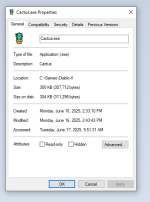
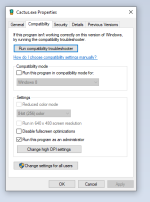
@fearedbliss Yeah, so I don't know if this is helpful or not, but my Cactus directory also happens to be in C:\Games, and Windows still always asks me if I want to run in Administrator, even though I have that selected in compatibility. - lol 🤷‍♂️
 

Attachments

  • 1.png
    1.png
    20.3 KB · Views: 134
  • 2.png
    2.png
    22.7 KB · Views: 110
Lol yea that's the default Windows behavior when running things in Admin Mode. For example, I normally keep my Diablo 1 in Games/Diablo/Diablo.exe and it always asks me for admin even if I tell it to when I run 1.09b of Diablo 1 (it doesn't ask me when running 1.00 Diablo 1). There's probably a combination of factors that Windows uses to determine if it needs Admin. One would be if you tell it to run the game in Admin. This doesn't mean "Don't ask for confirmation". It's like running a command on UNIX with doas/sudo, it might remember for a little bit but eventually it's gonna ask you for admin confirmation again. The second factor might be that even if you tell it to run the game as admin, if the game has some functionality that requires Admin, then it would also ask you. Although this wouldn't necessarily be done in the middle of runtime necessarily.

Although what I will say is that Windows only asked me I think the first time I ran it in that path (C:\Games\Diablo II) afterwards it didn't ask me anymore and it remembers lol. I don't have the flag selected.
 
You. are. a. GENIUS!!!

Haha - I just unticked the admin flag and the annoying Windows UAC does NOT appear anymore on multiple launches!!! 🤯🤣

I totally thought it would be the opposite behavior which is why I had it selected 😆
 
It should be perfectly fine to put it directly in the C:\ location. I put it in C:\Games\Diablo II thought. However what you need to keep in mind is that if you are putting Cactus in a system protected directory (like C:\), then you have to run Cactus in admin mode. Cactus properly supports running in admin mode. You just need to right click Cactus and run it as Administrator. You can also change the shortcut options to always launch the game in admin mode. I will re-test that this works as well, but there should be no issues doing so and it should definitely not delete any files that shouldn't be deleted. Cactus has extensive file protection mechanisms.

I will also document this in the Cactus documentation once I confirm everything is working as intended (should be).

Also keep in mind that for some mods you will need to run them in Admin Mode regardless of the location Cactus is installed in. So if you are playing a mod that requires Admin Mode, you will need to open Cactus in admin mode as well.
huh Interesting, I was running Cactus in admin mode when I was having all of the problems I mentioned. The only thing I changed was moving it from C:\ location to C:\Games and everything immediately started working as intended, so I just assumed installing directly into C:\ location was the problem.
 
When you say Cactus is running in C:\ I'm guessing you mean C:\Diablo II cause Cactus should be inside the Diablo II root directory to avoid weird behavior with saving screenshots and any other weird stuff. You technically could have the Cactus.exe and it's other files in other locations but those scenarios are not really supported given the weirdness I mentioned above. I also don't think you put your Diablo II root directory directly inside of C:\.. meaning C:\Game.exe and C:\Windows are on the same level.
 
Ahh yes you're correct, sorry I got a little confused there. I do have Cactus inside my Diablo II root directory however I renamed that folder to Cactus so instead of it showing C:\Games\Diablo II it shows C:\Games\Cactus. You're also correct saying that I did not put my Diablo II root directory directly into the C:\ drive because C:\Game.exe and C:\Windows are not on the same level.

Damn this is getting confusing, I regret starting this topic haha. Should the whole thread just be deleted?
 
Haha nah it's ok. You can leave it. So what was the original full path where it was failing?
 
Ok so the original full path where it failed was C:\Diablo II, this folder being my Diablo II root directory. But after I merged the Cactus files with my Diablo II files I immediately renamed the same folder to C:\Cactus. Hopefully I wrote that clearly enough, I'm in a little over my head here.
 
Ah ok. As long as Cactus is in the D2 Root folder you should be able to call it C:\Diablo II. This is also the default installation strategy in step 1 (all files copied to into the D2 root directory) and there is a message about weirdness in there already if the files aren't together. So I guess regardless of the admin mode, you were previously running with an unsupported configuration. I'm happy that's now resolved!
 
Back
Top