

- Joined
- Dec 19, 2021
- Messages
- 1,284
- Points
- 83
Hey folks,
I pushed up some updates to the Cactus front page that should hopefully help people get set up with Cactus a little easier. There are a few updates I've made:
1. Made the old Windows version of Cactus more prominent at the Downloads section at the top of the documentation, below the existing Cactus Bundle (For Linux) links.
This means that for people that are still using Windows 7 and Windows 10, they'll be able to easily find the needed files. Due note that there is no support for Cactus for Windows and this is just provided for convenience as is. It is recommended to switch to Linux. I still use Windows for testing Singling and Succulent, but that is for mod development since Windows is my base testing platform for Diablo II stuff since Diablo II was made for Windows. Even if I now play on Linux and develop Cactus on Linux, the game has to still be playable on Windows 7 and Windows 10, and those types of .dll changes are primarily windows related. However even with that said, the majority of users are not developing mods but are rather consumer of mods and utilities. Thus they shouldn't have to be susceptible to living their lives on Windows or depending on it in any way for Diablo II. With that said, you'll be able to access the following mirrors here and here. These contain all the files needed to run Cactus 4.0.0, cnc-ddraw, OpenAL w/ DSOAL on Windows 7 and Windows 10. If you are installing from a fresh install of Windows 7 RTM (SP0), you'll want to install Windows 7 SP1, .NET Framework 4.6.1, and Visual C++ 2015 Redistributable sequentially. These files are also included at the mirror links mentioned previously and are prefixed with a number indicating the installation order.
2. I've included the Cactus Installation Video at the top of download links. In addition to displaying the Primary and Secondary mirrors, the installation video is also included.
The Linux video is publicly available on YouTube, and the Cactus Installation Video for Windows is also publicly available but unlisted. I don't want the Windows version to come up in the search results and fragment the Linux views. The Linux version is the officially supported version and the Windows version is just here preserved for our beloved Windows 7 and Windows 10.
3. I've added the direct links to the Diablo II (2000) and Diablo II: Lord of Destruction (2001) shop links at Blizzard's website directly to the top.
I've been hearing that it's been difficult to find the pages to purchase Diablo II over at Blizzard's website. To make this easier I've added the direct links to both products to the Cactus documentation. Hopefully this helps people legally purchase a copy of our beloved Diablo II from Blizzard directly. As long as Blizzard provides an official channel to purchase the game, I'll keep linking to their page. If the link breaks, please email me and I'll take a look at fixing it. I've also noticed that the first time you click the link it may redirect you to another page on the site. Try clicking it a few times, it will get you to the product page eventually.
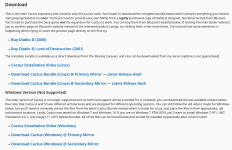
The page looks as follows:
Take care all and stay safe,
Jonathan
I pushed up some updates to the Cactus front page that should hopefully help people get set up with Cactus a little easier. There are a few updates I've made:
1. Made the old Windows version of Cactus more prominent at the Downloads section at the top of the documentation, below the existing Cactus Bundle (For Linux) links.
This means that for people that are still using Windows 7 and Windows 10, they'll be able to easily find the needed files. Due note that there is no support for Cactus for Windows and this is just provided for convenience as is. It is recommended to switch to Linux. I still use Windows for testing Singling and Succulent, but that is for mod development since Windows is my base testing platform for Diablo II stuff since Diablo II was made for Windows. Even if I now play on Linux and develop Cactus on Linux, the game has to still be playable on Windows 7 and Windows 10, and those types of .dll changes are primarily windows related. However even with that said, the majority of users are not developing mods but are rather consumer of mods and utilities. Thus they shouldn't have to be susceptible to living their lives on Windows or depending on it in any way for Diablo II. With that said, you'll be able to access the following mirrors here and here. These contain all the files needed to run Cactus 4.0.0, cnc-ddraw, OpenAL w/ DSOAL on Windows 7 and Windows 10. If you are installing from a fresh install of Windows 7 RTM (SP0), you'll want to install Windows 7 SP1, .NET Framework 4.6.1, and Visual C++ 2015 Redistributable sequentially. These files are also included at the mirror links mentioned previously and are prefixed with a number indicating the installation order.
2. I've included the Cactus Installation Video at the top of download links. In addition to displaying the Primary and Secondary mirrors, the installation video is also included.
The Linux video is publicly available on YouTube, and the Cactus Installation Video for Windows is also publicly available but unlisted. I don't want the Windows version to come up in the search results and fragment the Linux views. The Linux version is the officially supported version and the Windows version is just here preserved for our beloved Windows 7 and Windows 10.
3. I've added the direct links to the Diablo II (2000) and Diablo II: Lord of Destruction (2001) shop links at Blizzard's website directly to the top.
I've been hearing that it's been difficult to find the pages to purchase Diablo II over at Blizzard's website. To make this easier I've added the direct links to both products to the Cactus documentation. Hopefully this helps people legally purchase a copy of our beloved Diablo II from Blizzard directly. As long as Blizzard provides an official channel to purchase the game, I'll keep linking to their page. If the link breaks, please email me and I'll take a look at fixing it. I've also noticed that the first time you click the link it may redirect you to another page on the site. Try clicking it a few times, it will get you to the product page eventually.
The page looks as follows:
Take care all and stay safe,
Jonathan
Last edited:

