Always into the East...

neondrake

New member
Joined
Sep 16, 2026
Messages
6
Points
3
Hey, everyone! I'm Thomas, I've been playing d2 on and off since the battle chest came out, almost exclusively singleplayer vanilla. I've played a few vanilla mods like path of diablo, projectdiablo 2 and plugy, but never really got into endgame with the mods. I don't as much consider plugy a mod as a stash organizer, because that's really all I used it for.

Having played thousands of hours over multiple legacy installs, D2R from launch to all gear locked into gomule stashes around 2.4 update, started over on steam deck, installed a bunch of quality of life mods that broke my stashes when Reign of the Warlock came out, started over on my steam deck on rotw, and now my current install of d2r:RotW on my new linux box. After moving D2R to my steam deck, I had begun time traveling with cactus on my windows pc. Got 8-12 characters to act 4/nm act 1 ish in patch 1.00 and those saves are still chilling on that hard drive. I'm trying to get cactus working on my linux machine and then i'll move all of those time traveling saves over. Excited to get itall setup and start farming!
 
Welcome, @neondrake. Awesome intro post! It's always nice to meet other people who have been playing for 20+ years. It's good to know we're not alone, lmao. Would love to hear your thoughts on v1.00 and/or any other legacy patches you play. Happy time travels mate, and thanks for joining our humble caravan. ^_^
 
I just uninstalled and reinstalled wine and then launched cactus as root and tried to create a prefix and this is what i got:

info(frontend): Worldstone: 1.00
info(frontend): Shard: 1.00
info(frontend): Launcher (Default): Game.exe
info(frontend): Flags:
info(frontend): Notes:
info(filesystem): Creating new shard for /home/thomasestling/Downloads/Cactus/Shards/1.00/1.00 ...

info(filesystem): [ Linking Files ]

info(filesystem): Core Path: /home/thomasestling/Downloads/Cactus/Common/Core
info(filesystem): Worldstone Path: /home/thomasestling/Downloads/Cactus/Common/Worldstones/1.00
info(filesystem): Overlay Path: /home/thomasestling/Downloads/Cactus/Common/Overlays/1.00
info(filesystem): Shard Path: /home/thomasestling/Downloads/Cactus/Shards/1.00/1.00

info(filesystem): Request Type: .core
info(filesystem): Linking Path: /home/thomasestling/Downloads/Cactus/Common/Core

info(filesystem): Request Type: .worldstone
info(filesystem): Linking Path: /home/thomasestling/Downloads/Cactus/Common/Worldstones/1.00

info(filesystem): Request Type: .overlay
info(filesystem): Linking Path: /home/thomasestling/Downloads/Cactus/Common/Overlays/1.00

info(filesystem): No Overlay Detected. Skipping ...
002c:fixme:actctx:parse_depend_manifests Could not find dependent assembly L"Microsoft.Windows.Common-Controls" (6.0.0.0)
002c:fixme:winediag:loader_init wine-staging 11.0 is a testing version containing experimental patches.
002c:fixme:winediag:loader_init Please mention your exact version when filing bug reports on winehq.org.
0054:fixme:actctx:parse_depend_manifests Could not find dependent assembly L"Microsoft.Windows.Common-Controls" (6.0.0.0)
004c:fixme:actctx:parse_depend_manifests Could not find dependent assembly L"Microsoft.Windows.Common-Controls" (6.0.0.0)
0054:err:winediag:nodrv_CreateWindow Application tried to create a window, but no driver could be loaded.
0054:err:winediag:nodrv_CreateWindow L"The explorer process failed to start."
0054:err:systray:initialize_systray Could not create tray window
0054:err:ole:StdMarshalImpl_MarshalInterface Failed to create ifstub, hr 0x80004002
0054:err:ole:CoMarshalInterface Failed to marshal the interface {6d5140c1-7436-11ce-8034-00aa006009fa}, hr 0x80004002
0054:err:ole:apartment_get_local_server_stream Failed: 0x80004002
0044:err:winediag:nodrv_CreateWindow Application tried to create a window, but no driver could be loaded.
0044:err:winediag:nodrv_CreateWindow L"Make sure that your display server is running and that its variables are set."
004c:err:winediag:nodrv_CreateWindow Application tried to create a window, but no driver could be loaded.
004c:err:winediag:nodrv_CreateWindow L"Make sure that your display server is running and that its variables are set."
004c:err:ole:apartment_createwindowifneeded CreateWindow failed with error 3
004c:err:ole:apartment_createwindowifneeded CreateWindow failed with error 0
004c:err:ole:apartment_createwindowifneeded CreateWindow failed with error 14007
004c:err:ole:StdMarshalImpl_MarshalInterface Failed to create ifstub, hr 0x800736b7
004c:err:ole:CoMarshalInterface Failed to marshal the interface {6d5140c1-7436-11ce-8034-00aa006009fa}, hr 0x800736b7
004c:err:ole:apartment_get_local_server_stream Failed: 0x800736b7
004c:err:ole:start_rpcss Failed to open RpcSs service
002c:err:winediag:nodrv_CreateWindow Application tried to create a window, but no driver could be loaded.
002c:err:winediag:nodrv_CreateWindow L"Make sure that your display server is running and that its variables are set."
0080:err:ntoskrnl:ServiceMain Failed to load L"C:\\windows\\system32\\win32k.sys"
0080:err:ntoskrnl:ServiceMain Failed to load L"C:\\windows\\system32\\drivers\\dxgkrnl.sys"
0080:err:ntoskrnl:ServiceMain Failed to load L"C:\\windows\\system32\\drivers\\dxgmms1.sys"
0098:err:winediag:nodrv_CreateWindow Application tried to create a window, but no driver could be loaded.
0098:err:winediag:nodrv_CreateWindow L"Make sure that your display server is running and that its variables are set."
0098:err:setupapi:SetupDefaultQueueCallbackW copy error 1812 L"@C:\\windows\\system32\\mscms.dll,-1" -> L"C:\\windows\\system32\\spool\\drivers\\color\'srgb color space profile.icm"
Anything sticking out to you as an obvious problem?
 
Yup, I see this line "0054:err:winediag:nodrv_CreateWindow Application tried to create a window, but no driver could be loaded."

What distro are you on? Are you using X11 or Wayland? Depending on which one you are using, you'll want to check or uncheck the "Use Wayland Driver" checkbox in the Settings. Normally this is automatically detected and configured for you, but depending on the Linux and a variety of factors, it may need to be manually adjusted.

Don't launch Cactus as root. Cactus does not need any administrator permissions and everything runs within its own directory. That may be the reason why it's failing, launching as root means that your normal user's display server's environment variables are most likely not being used.

You may need to reset permissions for your Cactus folder since some files most likely got created as root...
 
Anything sticking out to you as an obvious problem?
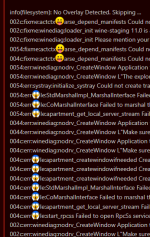
Yes, I believe I have diagnosed the issue. It seems your distro was attacked by emojis 😅
 

Attachments

  • Screenshot 2026.09.16 (14-57-36-992).png
    Screenshot 2026.09.16 (14-57-36-992).png
    43.2 KB · Views: 4
I'm on KDE Plasma 44, i'm using wayland... I THINK. Not positive how to check of wayland is running properly
I realized the permissions thing right after i tried when i tried running as user and it told me the files didn't belong to me. SO!
I re-extracted from the bundle to my home directory instead of /downloads, copied over the mpqs from my diablo 2 lod insttall and launched from Konsole (not as root). I checked the settings to confirm it was using the Wayland driver (it was) and tried to create a shard. This was the readout:

info(utilities): ==================================
info(utilities): Cactus 5.7.0
info(utilities): Jonathan Vasquez <jon@xyinn.org>
info(utilities): Simplified BSD License
info(utilities): ==================================

info(backend): Using Cactus Root Directory (Default): /home/thomasestling/Cactus
info(backend): Root Path: /home/thomasestling/Cactus

info(backend): [ Existing Cactus Installation ]

info(filesystem): Creating default settings file if needed ...
info(settings): Detected Display Server: wayland
info(settings): Using Wine Wayland Driver
info(settings): Loading settings from /home/thomasestling/Cactus/Cactus.json ...

info(frontend): Worldstone: 1.00
info(frontend): Shard: 1.00
info(frontend): Launcher (Default): Game.exe
info(frontend): Flags:
info(frontend): Notes:
info(filesystem): Creating new shard for /home/thomasestling/Cactus/Shards/1.00/1.00 ...

info(filesystem): [ Linking Files ]

info(filesystem): Core Path: /home/thomasestling/Cactus/Common/Core
info(filesystem): Worldstone Path: /home/thomasestling/Cactus/Common/Worldstones/1.00
info(filesystem): Overlay Path: /home/thomasestling/Cactus/Common/Overlays/1.00
info(filesystem): Shard Path: /home/thomasestling/Cactus/Shards/1.00/1.00

info(filesystem): Request Type: .core
info(filesystem): Linking Path: /home/thomasestling/Cactus/Common/Core

info(filesystem): Request Type: .worldstone
info(filesystem): Linking Path: /home/thomasestling/Cactus/Common/Worldstones/1.00

info(filesystem): Request Type: .overlay
info(filesystem): Linking Path: /home/thomasestling/Cactus/Common/Overlays/1.00

info(filesystem): No Overlay Detected. Skipping ...
002c:fixme:actctx:parse_depend_manifests Could not find dependent assembly L"Microsoft.Windows.Common-Controls" (6.0.0.0)
002c:fixme:winediag:loader_init wine-staging 11.0 is a testing version containing experimental patches.
002c:fixme:winediag:loader_init Please mention your exact version when filing bug reports on winehq.org.
004c:fixme:actctx:parse_depend_manifests Could not find dependent assembly L"Microsoft.Windows.Common-Controls" (6.0.0.0)
0054:fixme:actctx:parse_depend_manifests Could not find dependent assembly L"Microsoft.Windows.Common-Controls" (6.0.0.0)
0054:err:waylanddrv:wayland_process_init Wayland compositor doesn't support optional zwlr_data_control_manager_v1 (clipboard functionality will be limited)
004c:err:waylanddrv:wayland_process_init Wayland compositor doesn't support optional zwlr_data_control_manager_v1 (clipboard functionality will be limited)
0074:fixme:actctx:parse_depend_manifests Could not find dependent assembly L"Microsoft.Windows.Common-Controls" (6.0.0.0)
006c:fixme:actctx:parse_depend_manifests Could not find dependent assembly L"Microsoft.Windows.Common-Controls" (6.0.0.0)
0074:err:waylanddrv:wayland_process_init Wayland compositor doesn't support optional zwlr_data_control_manager_v1 (clipboard functionality will be limited)
006c:err:waylanddrv:wayland_process_init Wayland compositor doesn't support optional zwlr_data_control_manager_v1 (clipboard functionality will be limited)
004c:err:ole:StdMarshalImpl_MarshalInterface Failed to create ifstub, hr 0x80004002
004c:err:ole:CoMarshalInterface Failed to marshal the interface {6d5140c1-7436-11ce-8034-00aa006009fa}, hr 0x80004002
004c:err:ole:apartment_get_local_server_stream Failed: 0x80004002
0054:err:ole:StdMarshalImpl_MarshalInterface Failed to create ifstub, hr 0x80004002
0054:err:ole:CoMarshalInterface Failed to marshal the interface {6d5140c1-7436-11ce-8034-00aa006009fa}, hr 0x80004002
0054:err:ole:apartment_get_local_server_stream Failed: 0x80004002
0054:err:ole:start_rpcss Failed to open RpcSs service
0074:err:ole:StdMarshalImpl_MarshalInterface Failed to create ifstub, hr 0x80004002
0074:err:ole:CoMarshalInterface Failed to marshal the interface {6d5140c1-7436-11ce-8034-00aa006009fa}, hr 0x80004002
0074:err:ole:apartment_get_local_server_stream Failed: 0x80004002
006c:err:ole:StdMarshalImpl_MarshalInterface Failed to create ifstub, hr 0x80004002
006c:err:ole:CoMarshalInterface Failed to marshal the interface {6d5140c1-7436-11ce-8034-00aa006009fa}, hr 0x80004002
006c:err:ole:apartment_get_local_server_stream Failed: 0x80004002
0074:err:ole:start_rpcss Failed to open RpcSs service
006c:err:ole:start_rpcss Failed to open RpcSs service
002c:err:waylanddrv:wayland_process_init Wayland compositor doesn't support optional zwlr_data_control_manager_v1 (clipboard functionality will be limited)
0044:err:waylanddrv:wayland_process_init Wayland compositor doesn't support optional zwlr_data_control_manager_v1 (clipboard functionality will be limited)
00c8:err:ntoskrnl:ServiceMain Failed to load L"C:\\windows\\system32\\win32k.sys"
00c8:err:ntoskrnl:ServiceMain Failed to load L"C:\\windows\\system32\\drivers\\dxgkrnl.sys"
00c8:err:ntoskrnl:ServiceMain Failed to load L"C:\\windows\\system32\\drivers\\dxgmms1.sys"
00e0:err:waylanddrv:wayland_process_init Wayland compositor doesn't support optional zwlr_data_control_manager_v1 (clipboard functionality will be limited)
00e0:err:setupapi:SetupDefaultQueueCallbackW copy error 1812 L"@C:\\windows\\system32\\mscms.dll,-1" -> L"C:\\windows\\system32\\spool\\drivers\\color\\srgb color space profile.icm"
 
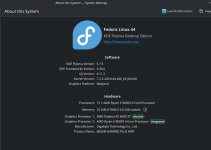
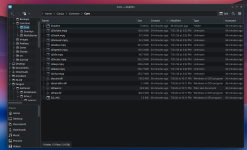
I'm guessing you mean Fedora Linux 44 (KDE Plasma). Yea that's using Wayland and it's also what I was running a few weeks ago so I know Cactus works well on that configuration. I don't see anything particularly wrong from the output. What symptoms are you seeing when you launch? Is it just quiet? Is there some sort of error window? Can you show me a screenshot of how your Common/Core directory looks like?
 
Last edited:
I'm guessing you mean Fedora Linux 44 (KDE Plasma). Yea that's using Wayland and it's also what I was running a few weeks ago so I know Cactus works well on that configuration. I don't see anything particularly wrong from the output. What symptoms are you seeing when you launch? Is it just quiet? Is there some sort of error window? Can you show me a screenshot of how your Common/Core directory looks like?
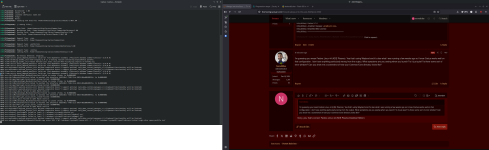
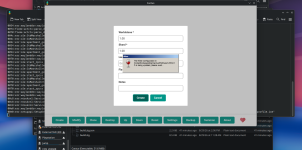
Sorry, yes, that's correct: Fedora Linux 44 (KDE Plasma Desktop Edition). Cactus launches, but when I try to create a shard, it hangs on this wine configuration, cactus freezes, and the wine window can't even be force closed, I have to restart the machine. I see that the terminal is throwing up errors as this happens, seemingly related to mostly "microsoft.windows.common-controls" and Wayland, although I don't know enough about what's happening to know what any of these things might mean.
 

Attachments

  • Screenshot_20260916_123609.png
    Screenshot_20260916_123609.png
    4.2 MB · Views: 3
  • Screenshot_20260916_123533.png
    Screenshot_20260916_123533.png
    849.9 KB · Views: 3
  • Screenshot_20260916_123308.png
    Screenshot_20260916_123308.png
    291.3 KB · Views: 2
  • Screenshot_20260916_123032.png
    Screenshot_20260916_123032.png
    896.8 KB · Views: 3
Ah ok. It may not be hanging, it just looks like it's hanging. Give it some time for it to finish. I've noticed on some machines this goes by faster than others. Let the wine configuration fully complete, wait a few min if needed and see if it goes away. Regardless of whether if you do a brand new shard, or click an existing shard and click "Reset", the same will happen since Reset re-installs/re-configures the Shard. Your MPQs look good in Core.

Also I did a fresh install of CachyOS on my box w/ KDE and the Terminal=false for the desktop no longer opens automatically. This means that for KDE in general, we need Terminal=true in the config on Wayland unfortunately. So switching from Fedora to CachyOS won't fix that issue. Maybe one day this will be fixed upstream.
 
Back
Top