Diablo II (OG/Not Resurrected) Controller Support

Manny

Administrator
Staff member
Joined
Mar 6, 2022
Messages
717
Points
63
Howdy --

I don’t know if any of you ever owned a PS1, but the original Diablo on Playstation (obviously) had controller support and it was actually pretty well implemented IMO.

After the release of D2R, although I knew I wouldn’t be interested in the game itself per say, I was still curious to see how certain technical things would fair, such as the controller support.

And my takeway is that overall, the D2R community is very pleased, and even praised controller play as a \"better\" alternative to KB/M play for a few reasons, in most scenarios

Sooo all that being said, I’m going to be tinkering this weekend, and will be sharing
follow up posts here soon on my thoughts on how it goes. I made a trip to Best Buy yesterday and picked up the latest/greatest Xbox controller with a wireless adapter, so I’m ready to go on the hardware front. Truth be told I needed one anyway for a few GoG games that I’ve picked up as well.

And a disclaimer: I definitely will be keeping my kb/m front and center for things like inventory management and buying/selling things in town!
 
I’ve owned a PS1 (The small white one) a while back but I never owned Diablo 1 for PS1. However I do know that it’s a little bit different than the PC one in terms of some balancing I believe and some of the lighting effects are actually better on PS1 than on PC, according to my friend, GaLaXyHaXz, who was the one who reversed engineered Diablo 1 and created the Devilution project. Also thanks to galaxy, Cactus has No CD for all of the versions :). Cactus wouldn’t have been as smooth without galaxy. I also found this post from when galaxy first released Devilution. I remember the reddit mods removing it and then I had to make a long post with legal evidence stating that it isn’t the original Diablo 1 source code and it’s a reversed engineered version under fair use. After that the mods didn’t take it down lol. Galaxy actually used the PS1 version of Diablo 1 to extract the debug symbols that the QA testers back then forgot to remove (for many reasons but one of them is probably either lazyness or carelessness since this type of debug symbol removal actually happened for a few games from what I remember). Galaxy combined the debug symbols with the reversed engineered data dump from running the PC version of Diablo 1 via IDA Pro, and then doing a crapload of work to connect the pieces. The debug symbols were the key to understanding all of the function names and a bunch of other pieces of data. It essentially acted as a VERY VERY important map.

Regarding the controller, I LOVED using it when I played Diablo III on my Switch (and when I also had a XB1). That game was MADE for controller (Even though it released on PC without it). It feels so right. Diablo II wasn’t designed for this and it shows, I haven’t played D2R but from what I’ve seen in terms of the controller UI, it’s good enough to play it but the amount of interactions you need to do for D2 and the way the game was designed, you really need a keyboard / mouse to bond with the game at that level. Diablo 1 is much simpler and yea it had the controller from the PS1 so yea, it’s gonna be amazing as well.
 
[mention]fearedbliss[/mention] That’s cool that your friend Galaxy used the PS1 version of Diablo as the base for Devilution. I’ve been meaning to pick up the GoG version of Diablo & Hellfire and then try the Devilution mod. It’s been many years since I’ve played D1. It’s a great game in it’s own right. It doesn’t hit me in the feels as does D2, but I think certain things about it are actually better. I agree with your sentiments you’ve posted elsewhere that the pacing of it all makes it seem more like a horror game. They nailed the atmosphere in D1. And that Tristram theme... I could listen to it for hours.

RE: D2/D2R, there are some advantages to the controller as you can instantly access a skill without first selecting it as you need to in OG D2. And for movement, each hero has 8 default directional animations, so it’s a natural fit for analog control, along with the added benefit that you can move at varying speeds. With a mouse you are either walking or running, and nothing in between.

Mainly the way I envision it for myself is a hybrid system where I’m using kb/m in town and the controller everywhere else. Most of my builds use few skills, so aside from binding the basics to buttons (for instance on my Bowazon my skills are primarily GA & Multi-Shot), the main things I will need to get right is analog movement (left-stick) and mouse positioning/aiming (right stick). Another advantage should be that moving while attacking is possible and avoiding attacks would be significantly easier. I play in 640x480 so I need all the extra time I can get. Sad to say, but I’ve been one-shot by Mephisto’s Kamehameha before, lol. He must have trained with Master Roshi :D

Oh, BTW, I will be using Xpadder for my initial testing, but will probably try other utilities as well until I find the best fit for D2.
 
Lol \"Mephisto’s Kamehameha\", don’t get me started. I’ve died back to back with that type of thing and that’s why I end up boosting my Cold Res if I’m gonna be running him like that (Well if possible, it’s not if I’m poor in the beginning of my self ladder resets, then I just pure tactical dodging and \"dance\" with him).

RE: GoG release. Yup you can definitely pick that up for the DIABDAT.MPQ. You can also buy the D1 disc (Make sure it isn’t scratched) on eBay for your collection <3 and then back it up. Either way you’ll be able to get that MPQ file out of there and then run it with DevilutionX if you want, or just run it directly with D1 1.09b and play OG vanilla :).

RE: D2 prelod is very similar to D1 in a lot of ways and it shows. D2 LOD evolved D2’s foundation to the next level and the feeling changed (even for D2 Classic 1.07+), but it’s still really good, just not the same D1 type of feeling. Having items no having level reqs already makes a huge difference let alone the lack of items found throughout the game.. a-la-D1. A weird thing was that they removed mana pots and also removed immunities in D2 pre lod. Then they brought back immunities in LOD, and then 1.10 brought mana pots back before Blizzard North was over. Although given D2 was designed (literally) to not have any mana pots, at this point I prefer D2 without pots cause it actually makes a lot of things in the game make sense (MPK, Energy as an attribute, Energy as a stat, Warmth, etc). Although just drinking a crapload of pots in 1.10 and blasting stuff is fun as well, but you don’t get the same sense of discipline and resource management that you have to do in 1.00 - 1.09 of the game.

RE:Controller. Yup that will work great. I just keep my stuff to 8 skills (I don’t use the other 8 hotkeys that were added as part of LOD, primarily cause I just can’t keep track of everything and I like to keep my hand in the same spot without too much movement to reduce fatique -- which using a controller is exactly the reason I liked using it for D3 on the consoles). Playing Torchlight III with a controller on the XB1 (When I had the XB1) was fun as well and I noticed the controller worked really well with it. TL3 is not the best one in the serious for sure, but I do think that they were able to still capture the essence of ARPGs even though it’s a lot more simplified than the previous TL games. It’s a shame TL3 didn’t become something much better than what it was.
 
After playing with controller in D2R I had to find a way to make it work in the original, I just can't go back to mouse as it does start to wear on my right arm after a while. After a few days of trial and error I've made a very good layout that makes the game 100% playable on all builds. My first few versions felt very clunky and would be a chore to play the game with, as time has gone on I've stopped making changes and have found myself just enjoying the game as I normally would. I made it playing bowazon to ensure it would be able to make quick movements and kite effectively while also being able to aim precisely and use skills which there are eight available binds.

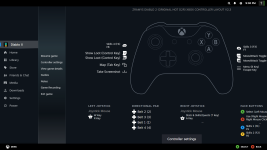
Heres the link to it which you can enable using the steam overlay, you just need to launch cactus/d2 through steam for it to work. steam://controllerconfig/3807975634/3741998168

Uses Left Trigger as a modifier for a 2nd layer
A - Left click (Select)
B - Right click (Use), hold for spam. hold modifier to Stand Still (to cast hammers etc)
X Y LB & RB - Skills. hold LT for 2nd layer
Left Trigger- Show loot
Right Trigger - Left click spam toggle. You want this enabled pretty much all the time unless manual looting/inventory managing.
Select - Save & Exit
Start - Inventory or hold modifier for Minimap

Thumbsticks:
Left moves quickly, Right for precision/selecting enemies in combat. Use them in conjunction
Left stick click - Run/walk or hold for Weapon Switch
Right stick click - Stats/Skills or hold modifier for Quest page

DPad: same belt binds as D2R hold modifier to instead give to mercenary
Slot 1 Left
Slot 2 Up
Slot 3 Down
Slot 4 Right

Most of the bind ideas used aren't exactly original but it's a lot less clunky than you'd think. The Left click spam toggle is the big win for the layout, it enables what is pretty much a instant enemy attack/auto gold/loot pickup/chest opener/barrel kicker that makes the game a lot smoother to play. You could of course simply not use it if you prefer to click everything manually. If you like controllers give it a try, it's how I'll be playing exclusively.
 
Last edited:
@zram Holy shit are you for real?! This is exciting as hell to see!

Can you please explain though for this old man millennial how to add/import your key bindings in Steam? That link isn't taking me anywhere useful from what I can tell. And I am not really a Steam user so unfortunately the UI is not something I'm really familiar with. But I did just figure out how to add and run Cactus from within Steam so that part is all set to go, lol.

I'm not a D2R player so I've never truly experienced the game with a controller, but I've always been super curious to play my favorite game of all time with one (well, as you can see from this thread, lol.) I never got it working though :/

Thanks for posting this!
 
I have cactus named Diablo II in steam. Try renaming it to that before because game name does appear to change the layout. Open big picture mode for steam, then you can either open the link (steam://controllerconfig/3807975634/3741829774) through Run in windows (R+Windows Key) or a browser, it should either open or prompt your permission to open the steam client where you can apply the layout; when you close it go to diablo ii in steam where you can click the controller button next to the cog wheel to see if it applied
steam layout.jpg

steam layout2.jpg

I hope this helps and if you try it let me know how it went:)
 
Last edited:
Progress is being made! The link never opened right for me BUT i found your template in the community layouts and applied it!

I just accidently killed a bunch of my full rejuvs with the d-pad lol. oooof lol

This feels weird AF though NGL but I'm going to try it for a bit to see if I can actually kill some mobs this way :LOL:

Thanks again. :)
 

Attachments

  • 2026-06-09 21_30_55-Diablo II.png
    2026-06-09 21_30_55-Diablo II.png
    185.1 KB · Views: 4
Progress is being made! The link never opened right for me BUT i found your template in the community layouts and applied it!

I just accidently killed a bunch of my full rejuvs with the d-pad lol. oooof lol

This feels weird AF though NGL but I'm going to try it for a bit to see if I can actually kill some mobs this way :LOL:

Thanks again. :)
Go on a barb and hit right trigger to enable click toggle, run around and aim at some mobs; Put leap attack on right click and try jumping from mob to mob by aiming and pressing your B(xbox)/O(ps) button. Mostly use left stick for moving & kiting, while right is more so for managing potions/aiming at enemies more precisely. Or however you want. With a little bit of getting used to it becomes very powerful. Keep the mouse closer to your hero than normal so you can quickly change directions. Could also tweak stuff around like sensitivity until it feels good for you. Also the one you found is a earlier version I just went and deleted all but the latest
 
I recorded some gameplay to show a little fighting/looting/inventory management in action. I click RT to enable running, then I am basically just aiming, pressing B to use spell, and hitting loot key from time to time. Very simple
 
Back
Top